Style breakdown · MrLololoshka
MrLololoshka's YouTube Thumbnails: How They're Made
MrLololoshka runs a Minecraft channel with 11.4 million subscribers, and his most-viewed videos pull between 7.7 and 17 million views each. We analysed his 10 most-viewed thumbnails to show which formats, labels and colours they share, and how to build a thumbnail in the same format for your own channel.
- 11.4M subscribers
- 10 most-viewed videos analyzed
- 7.7M to 17M views each
Pick a reference thumbnail
Click “Generate in this style” and the thumbnail opens in the generator as a reference. Add your photo and your video idea: 4thumb rebuilds the format — composition, presentation, colors and lighting — not the original’s face or text.
![Thumbnail of “😨 Minecraft SPEEDRUNNER vs 3 HUNTERS • [+ FLIGHT]” by MrLololoshka](https://i.ytimg.com/vi/TtdlfECyj-Q/mqdefault.jpg) Generate in this style
Generate in this style😨 Minecraft SPEEDRUNNER vs 3 HUNTERS • [+ FLIGHT]
15M viewsYouTube
![Thumbnail of “😱 Майнкрафт, Но ВЕСЬ МИР Одна Большая БУТЫЛКА [Полное Прохождение] + Фиксплей” by MrLololoshka](https://i.ytimg.com/vi/BsE4aoZJrP4/mqdefault.jpg) Generate in this style
Generate in this style😱 Майнкрафт, Но ВЕСЬ МИР Одна Большая БУТЫЛКА [Полное Прохождение] + Фиксплей
10M viewsYouTube
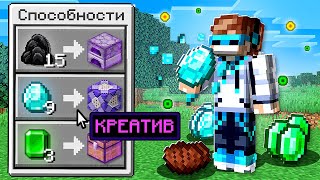 Generate in this style
😱 Minecraft, but EATING ITEMS Gives You SUPERPOWERS + FlackJK
8.5M viewsYouTube
![Thumbnail of “😉 Майнкрафт СПИДРАНЕР против 3 ОХОТНИКОВ • [+ ВОРОВСТВО ИНВЕНТАРЯ]” by MrLololoshka](https://i.ytimg.com/vi/2vMTgRvZTWg/mqdefault.jpg) Generate in this style
Generate in this style😉 Майнкрафт СПИДРАНЕР против 3 ОХОТНИКОВ • [+ ВОРОВСТВО ИНВЕНТАРЯ]
8.2M viewsYouTube
4thumb is not affiliated with MrLololoshka or their team. Thumbnails are shown to analyze the style and link to the original videos on YouTube. YouTube data as of October 19, 2026
What MrLololoshka's thumbnails have in common
The top thumbnails fall into two eras. Older ones are raw gameplay frames or drawings with an episode number. Newer ones are polished 3D renders built around one clear conflict or twist, most often a speedrunner facing three hunters. These six techniques carry most of the modern look.
| Technique | How MrLololoshka does it | How to repeat it |
|---|---|---|
| Colour-coded sides | Hero label in white or green, enemy label in red, pixel font in dark translucent boxes above each group | Give each side of your conflict one colour and put a 1-word label above each group in the same game-like font |
| Diorama cutaway | Characters stand in pits carved into a grass, dirt and stone cross-section, like a toy display case | Build the scene as a cross-section box with a thin top layer and a recessed floor so figures read as staged miniatures |
| 1 vs 3 imbalance | The hero stands alone; the rivals are a tight trio with raised weapons | Isolate your hero on one side and crowd an armed group on the other so the odds read without words |
| Visible twist mechanic | The episode's modifier is drawn in: a semi-transparent hero, a lucky block, a glowing sword, red '0' item counts, question marks over enemies | Pick the one rule that makes this video different, show it as an object or effect, and add a short '+ twist' word |
| Native game UI as frame | Hotbars, hearts, hunger bars, achievement popups and menu tooltips are enlarged and used as layout elements | Borrow the interface of your topic (app UI, scoreboard, menu) and place it along the bottom or side |
| Surreal scale concept | An entire world fits inside a glass bottle floating in the sky | Put the whole setting inside an unexpected object and keep the background a simple sky |
Main thumbnail formats on MrLololoshka's YouTube channel
Five formats appear across the 10 thumbnails. The speedrunner-versus-hunters split dominates and is the one worth copying as a format; the older styles show where the channel started.
- Speedrunner vs hunters split (4 of 10). One hero avatar against three armed rivals in a cutaway dirt and stone diorama, white vs red pixel labels, a game hotbar and hearts at the bottom, plus one twist element such as invisibility, cheats or theft.
- Concept render with twist (2 of 10). A single surreal idea (the world in a bottle) or a large game-menu panel explaining the rule change, with the avatar in a bright sunny Minecraft scene and a short neon pixel label.
- Raw frame with episode number (2 of 10). Older series covers: an unedited gameplay screenshot, sometimes with a large '#N' in the corner, no designed composition.
- Hand-drawn art (1 of 10). A simple fan-style drawing on white with a big outlined episode number.
- IRL vlog photo (1 of 10). A candid real-world photo with three huge stacked keywords painted across it.
Face and emotion: avatars instead of reaction shots
No real face appears in the top thumbnails. The creator is represented by a full-body blocky game avatar at medium scale, and emotion comes from pose and context rather than facial close-ups. If you want yourself in the scene, you can turn your own picture into a stylised character with thumbnail from a photo and keep the full-body staging.
- Show the hero full-body, not as a head crop: striding confidently, hiding with a grin, or holding a prized item.
- Let the rivals carry the tension: raised weapons, wide eyes, floating question marks.
- Keep the hero at medium scale so the whole setup (hero, rivals, twist) fits in one glance.
- If you use your own likeness, stylise it to match the game world instead of pasting a photo cut-out.
Text and the MrLololoshka thumbnail font
Text is minimal and game-native: blocky pixel fonts in dark semi-transparent rectangles, 1–3 words each, never the full title. Words act as role labels, not headlines.
- Label roles by colour: white or green for the hero, red for the enemies.
- Give twist words a neon green, magenta or yellow so they stand apart from the role labels.
- Place each label directly above the group it names, inside a dark translucent box.
- Older covers use only a large outlined '#N' episode number, no other words.
- The one IRL video breaks the rule with three huge stacked condensed words; treat that as an exception, not the template.
Light and color
Modern covers are lit like a bright sunny day, with saturated natural Minecraft tones and a few loud accents. Older covers are muted: plain gameplay tones, sepia horror, or flat white drawings. For general rules on contrast and readability, see the YouTube thumbnail design guide.
- Base palette: grass green, sky blue, diamond cyan, earthy dirt brown and grey stone.
- Accents: red for enemy labels, neon green or magenta for highlights and twists.
- Use even, sunny daylight on the diorama so every figure stays readable at small size.
- Keep the sky simple in concept renders so the central object pops.
How the first 20 seconds deliver on the thumbnail
The intros pay off the thumbnail fast. Speedrunner videos open with a cold-open clip of a tense or funny moment from mid-video, then cut to the standard greeting ("hello everyone, dear friends, I'm Loloshka") and immediately state the rules and goal of the versus challenge.
- Cold open first: a sudden scare, an inventory item vanishing, or a line like "Stop. What?".
- Then the greeting and the format name, so the viewer knows they are in the video the thumbnail promised.
- State the rules and goal right away, matching the 1-vs-3 setup on the cover.
- Twist videos try the twist on the spot: the superpower video starts with eating a diamond to unlock an ability.
- Older let's plays start straight with the greeting and a recap of where the series left off.
How to make a MrLololoshka-style thumbnail in 4thumb
- Pick a reference thumbnail from the formats above, for example a speedrunner vs hunters split, and press Generate in this style.
- Add your photos in the Face block if you want your own character in the scene; leave it empty for a pure game-avatar look.
- Describe your video idea: who the hero is, who the rivals are, and the one twist that makes this episode different.
- Enter 0–2 words in the Thumbnail text field, such as a role label or a short '+ twist' word.
- Generate 2–4 variants, compare them at small size, and use the Exact copy / Unique design switch to stay closer to or further from the reference layout.
Typical mistakes when copying this style
- Reaction-face close-ups. This style relies on full-body avatars and staged scenes, not big facial expressions.
- Long titles on the cover. Use 1–3 colour-coded pixel-font labels instead of writing the video title.
- No visible twist. A generic fight without the episode's modifier shown as an object or effect looks like every other Minecraft video.
- Too many characters. Extra figures and items break the 1-vs-3 imbalance that makes the format readable.
- Dark, flat lighting. The modern format needs bright, sunny, saturated renders, not desaturated scenes.
- Random fonts. Keep one game-interface typeface and the same dark label boxes throughout.
Questions
How are thumbnails on the MrLololoshka YouTube channel made?
The modern ones are bright 3D Minecraft renders: a lone hero avatar faces three armed hunters in a cutaway diorama, with white or green versus red pixel labels, a game hotbar at the bottom and one visible twist element. Older ones were raw gameplay frames or drawings with an episode number.
Can I use a MrLololoshka thumbnail as a reference?
Yes, as a format reference. 4thumb takes the composition, framing, light and label style from it, but the creator's character, text and logos are not copied. Your own face and your own text are used.
How much text should a MrLololoshka thumbnail have?
Very little: 1 to 3 words per label, in a blocky pixel font inside dark translucent boxes. Use colour to mark roles, such as green for the hero and red for enemies, and never put the full title on the cover.
Do I need my face in the thumbnail?
No. The top MrLololoshka thumbnails show no real face, only a full-body game avatar. If you want to appear, add your photos in the Face block and the scene is built around your likeness.
What size should the thumbnail be?
1280×720 pixels, a 16:9 ratio. 4thumb generates thumbnails in this format, so there is nothing to resize.
How much does it cost?
Each generation uses credits. New accounts get free credits to try the tool before buying more.
More creators
All creators



More guides
- Thumbnail ideas
Thumbnail ideas for tutorials, reviews, vlogs, challenges, comparisons, lists, stories and news — what to show, what text to use and what to avoid.
- Thumbnail from a photo
Turn your own photo into a YouTube thumbnail: how identity profiles work, which photos give the best likeness, consent rules and tips for expression and lighting.
- Thumbnail size guide
YouTube thumbnail size and dimensions: 1280×720 px, 16:9 aspect ratio, min 640 px wide, under 2 MB, JPG, PNG or GIF — plus the safe zones phones crop.
- Thumbnail design guide
Design principles for YouTube thumbnails: one focal point, contrast, color, typography, faces, consistency and testing — practical rules you can apply today.
Make your own versus-style thumbnail
Pick a format from this breakdown, add your idea and get several variants to compare.