Style breakdown · Nick DiGiovanni
Nick DiGiovanni's YouTube Thumbnails: Style Breakdown
Nick DiGiovanni's channel has 47.7 million subscribers, and his most-viewed videos pulled between 66 and 192 million views each. We analysed 10 of those top thumbnails to see how they are built and how you can apply the same format to your own videos.
- 47.7M subscribers
- 10 most-viewed videos analyzed
- 66M to 192M views each
Pick a reference thumbnail
Click “Generate in this style” and the thumbnail opens in the generator as a reference. Add your photo and your video idea: 4thumb rebuilds the format — composition, presentation, colors and lighting — not the original’s face or text.
 Generate in this style
50 Ways To Use Chocolate
192M viewsYouTube
 Generate in this style
$1 vs $100,000 Rare Food
146M viewsYouTube
 Generate in this style
I Ate Rare Food In EVERY Color
101M viewsYouTube
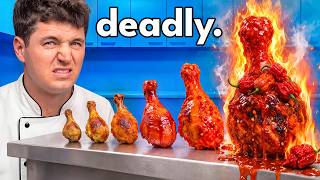 Generate in this style
10 Levels Of Spicy Food
66M viewsYouTube
4thumb is not affiliated with Nick DiGiovanni or their team. Thumbnails are shown to analyze the style and link to the original videos on YouTube. YouTube data as of October 19, 2026
What the thumbnails have in common
The top thumbnails turn cooking into spectacle. The main person, in a white chef's jacket, reacts to oversized, glistening food that escalates in scale, price or danger. Compositions are clean, lighting is bright and saturated, and there is almost no overlay text.
| Technique | How Nick DiGiovanni does it | How to repeat it |
|---|---|---|
| Uniform as identity | A white chef's jacket in almost every thumbnail, even in a jungle, on a boat or on a savanna | Pick one signature outfit tied to your niche and keep it consistent |
| Giant food as co-star | Food scaled to torso size or larger: a lobster bigger than the head, a chocolate castle | Make the key object at least as large as the face and push it toward the lens |
| Visible escalation | Items grow in size, price or intensity left to right, ending on fire or dripping | Line up 3–5 versions with the craziest one biggest and brightest at the end |
| Glossy motion details | Drips, splashes, molten pours, cheese pulls and flames | Add one liquid or motion element per object, sharp and glossy |
| Saturated color blocking | Cobalt-blue kitchens and skies make red, orange and brown food pop | Choose a clean background color complementary to your hero object |
| In-scene labels | Color name cards, country flags and props explain the concept | Put information on physical labels in the scene; keep overlay text to one word or a price |
Main thumbnail formats on the Nick DiGiovanni YouTube channel
Five formats cover all 10 analysed thumbnails. Each one visualizes the video's structure, so the viewer understands the premise before reading the title. For more starting points, browse thumbnail ideas.
- Escalating lineup (3 of 10). The main person stands on one side, gesturing or reacting, while a row of items such as colors, countries or spice levels grows or recedes across the counter.
- Three-panel creation triptych (2 of 10). Three equal panels of the same person in the same blue kitchen, each with a bigger, crazier creation from one ingredient. Used for "50 ways" videos.
- Two-panel split comparison (2 of 10). Left vs right scenes contrasting cheap and expensive or two exotic locations, sometimes with big price labels in the top corners.
- Duo / face-off (2 of 10). The main person shares the frame with a strong counterpart, like a grinning guest or a roaring lion, with a hero dish between or in front of them.
- Symmetrical luxury surround (1 of 10). The main person centered, framed by dishes held in from the edges by gloved hands, selling abundance.
Face and emotion
The main person is framed chest-up, close to camera, on one side or in the center, and always looks straight into the lens. Emotions are strong but simple, and the hands are always doing something. To get this framing with your own face, start from a thumbnail from a photo.
- Wide-eyed shock, open mouth for danger, price or weirdness.
- Broad toothy smile for abundance and fun.
- Skeptical stare when paired with an over-excited guest.
- Secretive shush to signal rarity.
- Active hands: holding food toward the viewer, presenting with an open palm or sweeping toward a lineup.
How much text, and the thumbnail font
Text appears on only 2 of 10 thumbnails. When it is used, it is minimal and huge. Most thumbnails rely on text inside the scene instead, so the title carries the hook and the image stays clean.
- Price labels like "$1" and "$100K" in heavy white sans-serif with a thick black outline, placed in the top corners of a split.
- One warning word in lowercase, ending with a period, across the top.
- In-scene text: color name cards in matching colored letters, flags on toothpicks.
- Rule of thumb: zero words, one word or one price. Never a headline.
Light and color
The imagery is bright, high-key and ultra-saturated. Blue backgrounds dominate so that warm food colors explode against them. For the general principles of contrast and readability, see the YouTube thumbnail design guide.
- Cobalt and sky blue backgrounds: kitchen cabinets, sky, sea.
- Warm hero colors: red lobster, orange fire, brown chocolate, red watermelon.
- Themed palettes replace blue when the concept demands: rainbow tile stripes for colors, gold satin for luxury, earthy greens for the jungle.
- Even, glossy lighting with sharp highlights on sauces and shells.
How the first 20 seconds deliver on the thumbnail
The thumbnail makes a promise and the intro confirms it immediately. Every intro restates the premise in the first sentence and then names the escalation the viewer is about to climb.
- Restate the promise: openers like "10 levels of spicy food" mirror the thumbnail directly.
- Name the escalation: methods get crazier, items rarer, animals bigger, prices climb to six figures.
- Tease the payoff: a lifetime supply giveaway, exploding a watermelon, surviving the spiciest pepper.
- Start at the bottom rung: "all starting with this $1 item" pulls viewers into the ladder.
How to make a thumbnail in this style with 4thumb
- Pick one of the reference thumbnails above and click “Generate in this style”. Use the “Exact copy” / “Unique design” switch to choose how closely to follow the layout.
- Add your photos in the “Face” block. Chest-up shots looking into the lens work best.
- Describe the video idea, including the hero object and how it escalates (for example, five desserts from cheap to luxury).
- Enter 0–2 words in the “Thumbnail text” field, such as a single price, or leave it empty.
- Generate 2–4 variants and compare them at small size, the way they appear in the feed.
Typical mistakes
- Small food. The object sits far away instead of being oversized and pushed toward the lens.
- Too many words. Long headlines fight a style built on images, props and at most one word or price.
- Dull background. Dim or cluttered scenes instead of a clean saturated color that contrasts with the food.
- Flat lineup. A row with no clear escalation gives the eye no climax at the end.
- Neutral face. A vague expression or eyes off camera loses the direct connection.
- Dry food. Matte food without drips, splashes, steam or flames kills the appetite appeal.
Questions
How does YouTube chef Nick DiGiovanni make his thumbnails?
Based on his 10 most-viewed thumbnails: he appears in a white chef's jacket, looks into the lens with a strong emotion, and shares the frame with oversized, glossy food that escalates in size, price or danger. Backgrounds are clean saturated blue or a themed palette, and overlay text is almost absent.
Can I use a Nick DiGiovanni thumbnail as a reference?
Yes, as a format reference. 4thumb takes the composition, framing, light and label style. The face, text and logos are not copied; your own face is used.
How much text should a thumbnail in this style have?
Very little. Only 2 of the 10 analysed thumbnails use overlay text, and then it is a single price or one word in heavy white sans-serif with a black outline. Labels inside the scene do the rest.
Do I need my face in the thumbnail?
For this style, yes. Every format centers on the main person reacting to the food with direct eye contact. Upload clear chest-up photos in the Face block for the best results.
What size should the thumbnail be?
1280×720 pixels, a 16:9 ratio. 4thumb generates thumbnails in this format.
How much does it cost?
Each generation uses credits. New accounts get free credits to try it out.
More creators
All creators



More guides
- Thumbnail ideas
Thumbnail ideas for tutorials, reviews, vlogs, challenges, comparisons, lists, stories and news — what to show, what text to use and what to avoid.
- Thumbnail from a photo
Turn your own photo into a YouTube thumbnail: how identity profiles work, which photos give the best likeness, consent rules and tips for expression and lighting.
- Thumbnail size guide
YouTube thumbnail size and dimensions: 1280×720 px, 16:9 aspect ratio, min 640 px wide, under 2 MB, JPG, PNG or GIF — plus the safe zones phones crop.
- Thumbnail design guide
Design principles for YouTube thumbnails: one focal point, contrast, color, typography, faces, consistency and testing — practical rules you can apply today.
Make your own giant-food thumbnail
Pick a reference, add your photo and generate a few variants in this style.