Style breakdown · Ali Abdaal
How to make an Ali Abdaal thumbnail
Ali Abdaal's channel has 6.7 million subscribers, and his most-viewed videos pulled between 4.6 and 13 million views each. We analysed 10 of his top thumbnails to see what they share and how you can apply the same format to your own videos.
- 6.7M subscribers
- 10 most-viewed videos analyzed
- 4.6M to 13M views each
Pick a reference thumbnail
Click “Generate in this style” and the thumbnail opens in the generator as a reference. Add your photo and your video idea: 4thumb rebuilds the format — composition, presentation, colors and lighting — not the original’s face or text.
 Generate in this style
9 Passive Income Ideas - How I Make $27k per Week
13M viewsYouTube
 Generate in this style
How to Invest for Beginners
9.4M viewsYouTube
 Generate in this style
Why You're Always Tired - 7 Myths Ruining Your Sleep
6.4M viewsYouTube
 Generate in this style
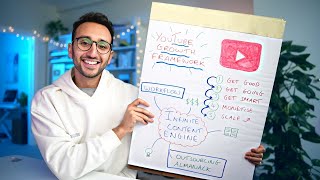
If I Started a YouTube Channel in 2026, I'd Do This
4.6M viewsYouTube
4thumb is not affiliated with Ali Abdaal or their team. Thumbnails are shown to analyze the style and link to the original videos on YouTube. YouTube data as of October 19, 2026
What Ali Abdaal's thumbnails have in common
His top thumbnails sell calm competence: a smiling person in a cozy, cinematic home office, paired with one clear visual idea. Text is rare, so the image itself carries the promise of a better, more productive life.
| Technique | How Ali Abdaal does it | How to repeat it |
|---|---|---|
| Cozy cinematic set | Tidy home office with plants, bookshelves, posters and fairy lights, shallow depth of field, cool blue on one side and warm lamp on the other | Shoot at a desk with a fast lens or portrait mode, a plant and warm lamp behind you, a blue or teal accent light opposite |
| Icon halo for list videos | Each tip becomes a colorful flat icon on a white rounded tile or circle floating around him | One simple flat icon per tip on white shapes, in two arcs left and right of your head, never over the face |
| One hero object | Holds a single topic-linked object toward the lens: keyboard, notebook, clock and hourglass | Pick the one prop that symbolizes the result and hold it close to the camera at a slight diagonal |
| Visible proof | Dense handwritten notes, bar charts or a filled-in framework board | Show a real artifact of your work with enough detail to look authentic, not meant to be read |
| Split transformation | Face cut by a thin line: dull and desaturated on one side, bright and warm on the other | Shoot two versions with identical framing, grade one cold and one warm, join them at the nose with a thin white line |
| Number as the promise | Huge bold white money figures like $27,000 or $0 → $1M | One large, specific number in heavy white sans-serif with a soft shadow; a bright green arrow for a from-to journey |
Ali Abdaal thumbnail templates: the main formats
Five formats cover all 10 analysed thumbnails. Each one is built around a single idea, so you can treat them as reusable templates.
- Hero object hold-up (3 of 10). He sits at a desk and presents one meaningful object toward the camera, such as a keyboard, a notes notebook or a hand-drawn framework board, as proof or a teaser of the method.
- Icon halo (2 of 10). He is centered and surrounded by floating white tiles or circles with colorful flat icons, one per tip or idea from a list video.
- Before/after split face (2 of 10). The face is split vertically into a bad half and a good half to show a transformation in skin or sleep, sometimes labeled BEFORE/AFTER.
- Script title over footage (2 of 10). An older style: b-roll or talking head with a large white handwritten-script title and a small white box label for the audience or a credibility claim.
- Money jump (1 of 10). Two big white dollar amounts on either side of him, connected by a bright green hand-drawn arrow arching over his head.
Face and emotion: calm, warm, trustworthy
The expression is the opposite of clickbait shock. He looks straight at the camera with a genuine smile, often showing teeth, framed waist-up or chest-up at a desk. If you want this look with your own face, start from a good portrait and turn it into a thumbnail from a photo.
- Smile naturally and keep eye contact with the lens.
- Use open gestures: a palms-up shrug or holding an object forward.
- Frame yourself waist-up or chest-up so the desk and set stay visible.
- Save strong expressions for contrast only: tired versus happy in a split shot, or a neutral stare in an extreme close-up.
- Wear plain solid colors (cream, grey, burgundy, teal) so clothing does not compete with icons or numbers.
Ali Abdaal thumbnail font and text placement
Half of the analysed thumbnails have no text at all. When text appears, it is one or two elements in heavy white sans-serif with a soft drop shadow. It never covers the face and never repeats the full video title.
- A single dollar amount at the bottom of the frame, or two amounts flanking the head.
- BEFORE in yellow and AFTER in white on split-face thumbnails.
- Older thumbnails: a large white handwritten-script title plus a small white rectangular label with dark uppercase text.
- Keep it to one number or two words; let the image explain the rest.
Light and color
The grading is natural and slightly desaturated, with crisp detail on the face. The signature is cool blue or teal ambient light against a warm orange lamp glow, with green plants and soft bokeh fairy lights in the background. For more on balancing contrast and accents, see our YouTube thumbnail design guide.
- Split the light: cool on one side, warm on the other.
- Blur the background so the face stays the sharpest element.
- Add color through graphics, not the set: flat icons, a bright green arrow or a yellow label.
- Keep saturation moderate; the mood is cozy, not neon.
How the first 20 seconds deliver on the thumbnail
The intros restate and deepen exactly what the thumbnail promised, so the click feels justified within seconds. Many open with "hey friends, welcome back" and move straight into a roadmap.
- The passive income video repeats the $27,000 figure and breaks it into nine income sources.
- The typing video opens with credentials (a doctor in the UK) and calls fast typing a superpower.
- Study videos lead with Cambridge credentials and evidence-based backing.
- The time-management video claims ten years of reading productivity books.
- The skincare intro gives the core answer first, then promises the deeper why.
- A clear structure is announced early: three parts, ten tips or a three-part framework.
How to make this style in 4thumb
- Pick one of the reference thumbnails above that matches your video and press Generate in this style.
- Add your own photos in the Face block.
- Describe your video idea in a sentence or two: the topic, the promise and any prop, icons or number you want.
- Enter 0–2 words in the Thumbnail text field, for example a single dollar figure, or leave it empty.
- Generate 2–4 variants and compare them at small size; choose Exact copy to stay close to the reference layout or Unique design for a freer take. Check our thumbnail ideas if you need more angles.
Typical mistakes when copying the style
- Shocked face. An open-mouth reaction breaks the style, which relies on a calm, confident smile that signals trust.
- Too much text. Long titles clutter the frame; one big number or two words is the limit.
- Messy icons. Icons over the face or mixed icon styles look cheap; use one consistent flat set on white shapes.
- Flat lighting. An evenly lit room without depth of field loses the cozy blue and warm cinematic mood.
- Tiny prop. A hero object held too small or too far away does not read at thumbnail size.
- Mismatched halves. Before/after halves should differ only in color grade and expression, not in framing.
Questions
How does Ali Abdaal make his YouTube thumbnails?
Based on 10 of his top thumbnails, the formula is a smiling person in a cozy, softly blurred home office lit with cool blue and warm lamp light, plus one visual idea: a hero object, a halo of flat icons, a before/after split face or a money jump with a green arrow.
Can I use an Ali Abdaal thumbnail as a reference?
Yes, as a format reference. 4thumb takes the composition, framing, light and label style, but his face, text and logos are not copied. Your own face and video idea are used instead.
How much text should an Ali Abdaal style thumbnail have, and what font?
Very little. Half of his top thumbnails have no text. When there is text, it is one number or two words in a heavy white sans-serif with a soft drop shadow; older thumbnails used a white handwritten-script title.
Do I need my face in the thumbnail?
For this style, yes in most cases. Nearly every format is built around a calm, smiling person looking at the camera. The b-roll format with a script title is the main exception.
What size should the thumbnail be?
YouTube thumbnails are 1280×720 pixels in a 16:9 ratio. 4thumb generates thumbnails in this format, so you can upload them directly.
How much does it cost?
Each generation uses credits. New accounts get free credits so you can try the style before paying.
More creators
All creators



More guides
- Thumbnail ideas
Thumbnail ideas for tutorials, reviews, vlogs, challenges, comparisons, lists, stories and news — what to show, what text to use and what to avoid.
- Thumbnail from a photo
Turn your own photo into a YouTube thumbnail: how identity profiles work, which photos give the best likeness, consent rules and tips for expression and lighting.
- Thumbnail size guide
YouTube thumbnail size and dimensions: 1280×720 px, 16:9 aspect ratio, min 640 px wide, under 2 MB, JPG, PNG or GIF — plus the safe zones phones crop.
- Thumbnail design guide
Design principles for YouTube thumbnails: one focal point, contrast, color, typography, faces, consistency and testing — practical rules you can apply today.
Make your own Ali Abdaal style thumbnail
Pick a reference, add your photo and generate a few variants in minutes.