Style breakdown · Kurzgesagt
Kurzgesagt YouTube Thumbnails: How the Style Works
Kurzgesagt has 25.7 million subscribers, and its most-viewed videos pulled between 32 and 89 million views each. We analysed the 10 most-viewed Kurzgesagt thumbnails to see what they share and how to build a thumbnail in the same format for your own topic.
- 25.7M subscribers
- 10 most-viewed videos analyzed
- 32M to 89M views each
Pick a reference thumbnail
Click “Generate in this style” and the thumbnail opens in the generator as a reference. Add your photo and your video idea: 4thumb rebuilds the format — composition, presentation, colors and lighting — not the original’s face or text.
 Generate in this style
The Coronavirus Explained & What You Should Do
89M viewsYouTube
 Generate in this style
What If You Detonated a Nuclear Bomb In The Marianas Trench? (Science not Fantasy)
36M viewsYouTube
 Generate in this style
The Largest Star in the Universe – Size Comparison
35M viewsYouTube
 Generate in this style
Why Black Holes Could Delete The Universe – The Information Paradox
32M viewsYouTube
4thumb is not affiliated with Kurzgesagt or their team. Thumbnails are shown to analyze the style and link to the original videos on YouTube. YouTube data as of October 19, 2026
What Kurzgesagt thumbnails have in common
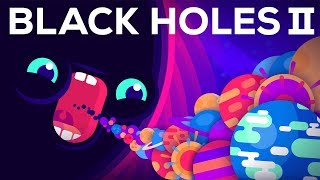
Every thumbnail is a flat vector illustration with no live presenter: one bold, glowing subject on a dark cosmic or microscopic background, under a huge white all-caps headline of 1–3 words. The subject is a single giant object, a cartoon character with oversized eyes, or an extreme scale comparison with an arrow.
| Technique | How Kurzgesagt does it | How to repeat it |
|---|---|---|
| Edge-to-edge headline | Topic name in bold white geometric sans caps across almost the full top width, no outline or box | Pick 1–3 words, set them in heavy white caps and scale until they touch both side margins |
| Glow against darkness | Subjects emit soft outer glow and rim light on navy, indigo or black | Use a near-black blue or purple background and give the central object a bright halo and light rays |
| Eyes on abstract things | Germs, viruses, aliens and black holes get huge cartoon eyes and mouths | Personify your topic with oversized round eyes, white highlights and a gaping or teeth-baring mouth |
| Tiny dot vs giant | A thick white arrow points to a minuscule glowing dot under a massive curved surface | Fill the top half with a cropped giant object, leave dark space below, add arrow and label |
| Curved horizon stage | A planet curve at the bottom acts as a stage for explosions and creatures | Place a curved horizon in the lower third and put the dramatic event at its center |
| Confetti particles | Small colored dots and four-point sparkles scatter around the subject | Sprinkle pink, teal and blue dots of varying sizes to add depth without clutter |
The three Kurzgesagt thumbnail formats
Across the 10 thumbnails, three formats repeat. Two of them cover 8 of the 10, so you can treat them as the core templates.
- Hero object under headline (4 of 10). A single glowing object or creature, such as an egg, an explosion or a bacteriophage, centered on a dark starry background, often on a curved planet horizon, with the topic in white caps across the top.
- Cartoon character with big eyes (4 of 10). Viruses, germs, aliens or a black hole personified with huge round eyes and mouths, either menacing or comically shocked. Variants include giant eyes behind a central threat, monsters attacking a hand, a cyclops alien trio and a character devouring objects.
- Size comparison with arrow (2 of 10). A gigantic curved surface fills the top half; below, a white arrow points to a tiny dot labeled with a familiar object, so the scale reads instantly.
Face and emotion without a real person
There is no real person on any of these thumbnails. Emotion comes from cartoon characters with enormous round eyes, pupil highlights and open mouths: wide-eyed alarm, menacing grins with jagged teeth, or comic gulping. If you want yourself in the frame, you can turn your own picture into a thumbnail from a photo and have it drawn in the same flat style.
- Draw any person as a flat-shaded cartoon, not a photo cutout.
- Give the face the same oversized, staring eyes as the creatures.
- Center the face or fill the frame with a close-up.
- Match the expression to the topic: awe for space, alarm for threats.
- Keep one character dominant; a trio works only when they read as one group.
Kurzgesagt thumbnail font and text placement
Text is minimal and always the topic noun, never a sentence: 1–3 words like a subject name or a short what-if phrase. It is set in white bold geometric sans-serif, all caps, spanning the full top edge with no stroke, shadow box or color highlights.
- Headline sits at the top and runs nearly edge to edge.
- No outlines, drop shadows or colored highlight words.
- Size comparisons add a second, smaller white label next to a thick white arrow at the bottom.
- The single exception uses red caps on a light background.
- Sequels add a Roman numeral rather than a longer title.
Light, color and the Kurzgesagt art style
Backgrounds are deep navy, indigo, plum or near-black, sometimes graded to magenta or maroon. Subjects use saturated neon hues in flat shapes with soft gradients, no outlines and strong outer glow. For general contrast and layout rules, see our YouTube thumbnail design guide.
- Subject palette: hot pink, orange, yellow, cyan, teal, mint green.
- Warm subjects like fire and stars sit on dark red.
- Cool subjects like black holes and oceans sit on blue-violet.
- Each thumbnail is dominated by one color temperature plus one contrasting accent.
- Light comes from the subject itself as a glow, not from an outside source.
How the intros deliver on the thumbnail
The first seconds immediately expand the thumbnail's single subject with stakes or a big question, so the viewer gets exactly what the image promised.
- What-if thumbnails open by restating the scenario and listing dramatic consequences.
- Size comparisons open by asking what the largest thing is and promise a journey of scale.
- Character thumbnails open with conflict, for example: "Every second of your life, you are under attack."
- Story videos open directly in second-person narration.
How to make a Kurzgesagt-style thumbnail in 4thumb
- Pick one of the reference thumbnails above and click Generate in this style.
- Add your photos in the Face block if you want a cartoon version of yourself; skip it for a pure object or creature thumbnail.
- Describe the video idea: the one subject, the scale or the threat, and the mood.
- Enter 0–2 words in the Thumbnail text field, ideally the topic noun.
- Generate 2–4 variants, using the Exact copy / Unique design switch, and compare them at small size before choosing.
Common mistakes when copying the style
- Photos or 3D renders. The look depends on flat vector shapes with rounded geometry and soft gradients.
- Sentence-length text. Use 1–3 topic words in white caps across the top, not a full title.
- Too many objects. Several equal-weight items replace the one dominant glowing subject.
- Reaction-style extras. Outlines, drop shadows, yellow text or red arrows break the clean educational look.
- Light backgrounds. Bright or white backgrounds kill the neon glow contrast.
- Small, realistic eyes. Characters lose the emotional cartoon read without oversized round eyes.
Questions
How does Kurzgesagt make its YouTube thumbnails?
They use flat vector illustrations with one glowing subject on a dark background and a white all-caps headline of 1–3 words across the top. The subject is a giant object, a big-eyed cartoon character or a size comparison with an arrow.
Can I use a Kurzgesagt thumbnail as a reference?
Yes, as a format reference. 4thumb takes the composition, framing, light and label layout; the creator's face, text and logos are not copied, and your own face is used if you add photos.
How much text should a Kurzgesagt-style thumbnail have?
One to three words, usually the topic noun or a short what-if phrase, in bold white geometric caps. Size comparisons add one small label next to an arrow.
Does Kurzgesagt show a face, and do I need mine in the thumbnail?
No real face appears on these thumbnails; emotion comes from cartoon characters with huge eyes. You can skip your face entirely or add photos and have yourself drawn as a flat cartoon with the same oversized eyes.
What size should the thumbnail be?
1280×720 pixels, a 16:9 ratio. 4thumb generates thumbnails in this format.
How much does it cost?
Each generation uses credits. New accounts get free credits to try it.
More creators
All creators


More guides
- Thumbnail ideas
Thumbnail ideas for tutorials, reviews, vlogs, challenges, comparisons, lists, stories and news — what to show, what text to use and what to avoid.
- Thumbnail from a photo
Turn your own photo into a YouTube thumbnail: how identity profiles work, which photos give the best likeness, consent rules and tips for expression and lighting.
- Thumbnail size guide
YouTube thumbnail size and dimensions: 1280×720 px, 16:9 aspect ratio, min 640 px wide, under 2 MB, JPG, PNG or GIF — plus the safe zones phones crop.
- Thumbnail design guide
Design principles for YouTube thumbnails: one focal point, contrast, color, typography, faces, consistency and testing — practical rules you can apply today.
Make a thumbnail in the Kurzgesagt format
Pick a reference, describe your idea and compare a few flat, glowing variants in minutes.