Style breakdown · Iman Gadzhi
How to make an Iman Gadzhi thumbnail
Iman Gadzhi runs a YouTube channel with about 6.2 million subscribers, and his most-viewed videos pulled between 252K and 1.6M views each. We analysed 11 of those thumbnails to break down how they are built: layout, face, text, color and the intros that follow. Below is the method, plus a quick way to apply the format to your own videos.
- 6.2M subscribers
- 11 most-viewed videos analyzed
- 252K to 1.6M views each
Pick a reference thumbnail
Click “Generate in this style” and the thumbnail opens in the generator as a reference. Add your photo and your video idea: 4thumb rebuilds the format — composition, presentation, colors and lighting — not the original’s face or text.
 Generate in this style
Give Me 26 minutes, I'll Give You 10,000 hours of Claude Knowledge
1.6M viewsYouTube
 Generate in this style
You're Not Late (Yet): Learn 98% of Gemini in Under 26 Minutes
407K viewsYouTube
 Generate in this style
Revealing My $5.4 BILLION Bet...
381K viewsYouTube
 Generate in this style
These 3 AI Businesses Will Make You $373/Day (With Zero Employees)
252K viewsYouTube
4thumb is not affiliated with Iman Gadzhi or their team. Thumbnails are shown to analyze the style and link to the original videos on YouTube. YouTube data as of October 19, 2026
What defines the Iman Gadzhi style
Most of these thumbnails sell make-money-online and AI-tool education. A calm, centered main person is framed by clean graphic proof: income numbers, app icons and dashboard cards. A few cinematic luxury scenes cover his investor and lifestyle videos. The overall look is minimal, symmetrical and premium, not loud.
| Technique | How Iman Gadzhi does it | How to repeat it |
|---|---|---|
| Specific odd numbers | Precise, non-round income figures like $12,950/Month, $1,467/Week or $631/Day, sometimes with rolling digits | Use an exact amount with a time unit and make it the largest element after the face |
| White headline + colored italic tag | Big white sans-serif main line, with a short qualifier ('a day', '/Week', 'With AI') in green, yellow or blue italic | Split text into one white main line and one small colored italic modifier; never more than two lines |
| Calm centered authority | Dead center, chest-up, looking into the lens with a half-smile or shrug, never shocked | Shoot straight on at eye level with soft frontal light and a relaxed expression, then cut out cleanly |
| App icons as proof | Rounded app icons with glow, sometimes 3D or held in hand, showing the tools covered | Use 1–8 rounded-square icons in brand colors, evenly spaced, with a subtle glow on a dark background |
| Dashed connector logic | White dashed lines link hours of effort to a money outcome | Input top left, output top right, a dashed line routed down and behind the subject |
| Brand-color template swaps | The same 'You're Not Late Yet' layout recolored orange for one tool and green for another | Build one master layout and swap the accent color and icons per topic |
Iman Gadzhi thumbnail templates: the main formats
Across the 11 thumbnails, six repeatable layouts appear. None dominates; most show up twice, which suggests a small set of templates rotated by topic.
- Headline + floating UI dashboards (2 of 11). Centered chest-up cut-out under a giant white headline, surrounded by blurred chat windows, revenue dashboards, profit counters and app icons.
- App icons with income figures (2 of 11). A row or grid of rounded icons around the person, paired with a big monthly income headline or color-coded per-day earnings under each icon.
- Time in → money out diagram (2 of 11). An hours-per-day label on one side, a money figure or revenue card on the other, joined by white dashed lines behind the person.
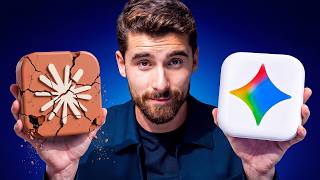
- Comparison (2 of 11). Either a chalkboard table with red/yellow/green values and a winning column, or the person holding a cracked old icon next to a shiny new one.
- Cinematic lifestyle scene (2 of 11). Crisp, graded scenes of luxury or scale, such as standing atop a tower wrapped in an LED dollar figure for 'Revealing My $5.4 BILLION Bet...'.
- Triptych montage (1 of 11). Three lifestyle panels with a huge one- or two-word white caption across the bottom.
Face and emotion: the calm mentor
The face does the opposite of typical clickbait. The person is centered, chest-up and sharp, looking straight into the camera with a composed, slightly amused expression. Authority comes from calm, not from a reaction. If you want this framing from your own photo, start with a thumbnail from a photo.
- Closed-mouth half-smile, raised brows or a palms-up shrug; no open-mouth shock.
- Eye-level, straight-on angle so the gaze meets the viewer.
- Glasses and plain dark or white tops keep a 'smart mentor' look.
- Clean cut-out edges so the person separates from the dark background.
- In lifestyle scenes, profile or full body: the setting signals success instead of the expression.
Text and the Iman Gadzhi thumbnail font
Text is minimal: usually one dollar figure with a time unit, or a short reassurance like 'You're Not Late Yet'. The font is a large, clean, modern sans-serif in white with a slight top-to-bottom grey gradient and no outline or bevel.
- Place the main line across the top or in the upper corners, above the head.
- Add secondary words in a smaller bold italic in money-green, yellow or blue, optionally with a soft glow.
- Microcopy inside UI cards is there for realism, not to be read.
- Cinematic scenes carry no text or one integrated number, like an LED band on a building.
- At most one hand-drawn marker circle or underline to highlight a key number.
Light and color
The palette is dark and controlled, with color reserved for meaning. For general rules on contrast and hierarchy, see the YouTube thumbnail design guide.
- Backgrounds: dark charcoal or deep navy gradients with a soft blue halo behind the head, or a light grey blurred office for UI layouts.
- Accents carry meaning: money-green for gains, red for losses, yellow for highlights.
- App icon brand colors (orange, green, blue) set the accent for each tool-specific version.
- Skin is evenly lit and slightly warm; the whole image is sharpened and contrasty.
- Lifestyle shots use saturated daylight blues or a sunset orange-blue grade.
How the intros deliver on the thumbnail
The first seconds pay off the thumbnail's promise immediately, with no long warm-up. The opening line usually restates the number, tool or bet shown in the image.
- Filter the audience. AI-tool videos tell viewers happy with boring tasks to leave, and promise the rest a way out.
- Contrarian claim. One opens by saying everyone uses Claude and ChatGPT while ignoring the tool he earns more with.
- Lead with the outcome. Money videos start with people paid well without experience or showing their face.
- Get straight to it. One intro: "let's get straight into the best AI business you can start today".
- Continue the image. The $5.4 billion tower thumbnail cuts straight to him announcing the bet on location in Almaty.
How to make this kind of thumbnail in 4thumb
- Pick a reference thumbnail from the examples above and press Generate in this style.
- Add your own photos in the Face block — a straight-on, eye-level shot with a calm expression works best for this format.
- Describe your video idea: the tool, the result or the comparison you want to show.
- Enter 0–2 words in the Thumbnail text field, ideally an exact figure with a time unit.
- Generate 2–4 variants, use the Exact copy / Unique design switch to control how close to the reference you stay, and compare them at small size. Need more angles? Browse thumbnail ideas.
Common mistakes when copying this style
- Overloading the frame. Many icons, arrows and text blocks break the clean, symmetrical layout that relies on dark negative space.
- Shocked faces. A screaming or wide-eyed expression contradicts the calm, knowing authority of this style.
- Round numbers. '$10K' or 'lots of money' reads as vague; use precise, odd figures with a time unit.
- Heavy text effects. Outlines, bevels and multicolor words clash with flat white sans-serif plus one small colored italic accent.
- Off-center subject. In the money layouts the person must be the central anchor, framed chest-up and large.
- Flat screenshots. Low-resolution UI pasted flat looks cheap; cards should float with depth, soft shadows and partial blur.
Questions
How does Iman Gadzhi make thumbnails for his YouTube channel?
His most-viewed thumbnails place a calm, centered, chest-up cut-out on a dark gradient and surround it with proof: exact income figures, glowing app icons, dashboard cards or a dashed time-to-money diagram. A few videos use cinematic luxury scenes instead.
Can I use an Iman Gadzhi thumbnail as a reference?
Yes, as a format reference. 4thumb takes the composition, framing, light and label placement, but his face, text and logos are not copied. Your own face from the photos you upload is used.
How much text should an Iman Gadzhi style thumbnail have?
Very little: one main line, usually an exact dollar figure with a time unit or a short phrase, plus an optional small colored italic modifier. Never more than two lines.
Do I need my face in the thumbnail?
For the money and AI-tool layouts, yes: the centered, calm face is the anchor of the design. Cinematic lifestyle scenes can show you in profile or full body, where the setting does the work.
What size should the thumbnail be?
1280×720 pixels in a 16:9 aspect ratio. 4thumb generates thumbnails in this format, so no resizing is needed.
How much does it cost?
Each generation uses credits. New accounts get free credits to try the tool before buying more.
More creators
All creators



More guides
- Thumbnail ideas
Thumbnail ideas for tutorials, reviews, vlogs, challenges, comparisons, lists, stories and news — what to show, what text to use and what to avoid.
- Thumbnail from a photo
Turn your own photo into a YouTube thumbnail: how identity profiles work, which photos give the best likeness, consent rules and tips for expression and lighting.
- Thumbnail size guide
YouTube thumbnail size and dimensions: 1280×720 px, 16:9 aspect ratio, min 640 px wide, under 2 MB, JPG, PNG or GIF — plus the safe zones phones crop.
- Thumbnail design guide
Design principles for YouTube thumbnails: one focal point, contrast, color, typography, faces, consistency and testing — practical rules you can apply today.
Try the Iman Gadzhi thumbnail format on your video
Upload your photo, pick a reference and get several on-brand variants to compare in minutes.