Category · Stories
Story time thumbnail: how to make one for a Stories video
We analysed the 10 most-viewed thumbnails from 1 top Stories creator, Dhar Mann, to see what makes scripted story videos get clicked. Below are the layout, emotion, headline and colour rules behind them, plus how to apply them to your own video in 4thumb.
- 1 creator
- 10 templates
Pick a thumbnail from this niche
Click “Generate in this style” and the thumbnail opens in the generator as a reference. Add your photo and your video idea: 4thumb rebuilds the format — composition, presentation, colors and lighting — not the original’s face or text.




What works in Stories thumbnails
Stories thumbnails sell a scene, not a host. The most-viewed examples work like a drama poster: one actor showing one exaggerated emotion, a blurred real-life set, and a headline that states the whole premise before the click. Variety comes from the emotion and the words, while the layout stays fixed.
| Technique | Why it works in this niche | How to do it |
|---|---|---|
| Fixed left-text / right-face split | Viewers recognise the channel in the feed before reading a word | Headline box on the left ~55%, face on the right, small name tag bottom left; only swap face, emotion, set and words |
| Premise as a full sentence | Story viewers click for the conflict and the moral, so they need to understand the plot instantly | Write 6–9 words: a character, an action and a conflict, not a vague teaser |
| One blue power phrase | Highlighting the twist tells the eye where the stakes are | Colour only the verb, twist or number line in sky blue; keep the rest white |
| Single maximal emotion | One clear feeling stays readable at tiny size and sets the story's tone | Pick the emotion that matches the headline (tears, eye-roll, gasp) and push it; keep the face sharp and close |
| Real, blurred set for context | The setting (school hallway, couch, diner, office) tells you where the drama happens without competing with the face | Use shallow depth of field and a set that belongs to the story |
| Thumbnail text rewritten from the title | Adds a second angle instead of repeating what the title already says | Test a line that adds new information, e.g. a time frame or a transformation |
Short film thumbnail formats in Stories
Across the 10 analysed thumbnails, all formats share the same split layout; what changes is the emotion and who is in the frame. All five are used by Dhar Mann.
- Tearful or worried close-up (3 of 10) — a child or teen near tears, looking off-camera, with a premise about being ignored, bullied or helped. Used by Dhar Mann.
- Shocked or disbelieving close-up (3 of 10) — wide eyes, open mouth or side-eye, paired with transformation premises like becoming popular or getting to be in charge. Used by Dhar Mann.
- Attitude / anger close-up (2 of 10) — an eye-roll, snarl or sneer from the story's troublemaker. Used by Dhar Mann.
- Two-person confrontation (1 of 10) — the crying main person in the centre and an aggressor pointing and shouting from the frame edge. Used by Dhar Mann.
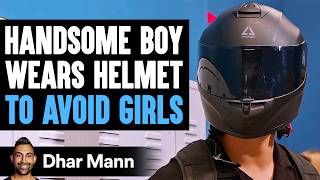
- Hidden-face mystery prop (1 of 10) — the face is covered by an odd object such as a helmet, so the prop becomes the hook. Used by Dhar Mann.
Top Stories creators and their thumbnail style
Dhar Mann
Dhar Mann uses one extremely consistent template: a cinematic head-and-shoulders close-up of an actor on the right, face filling roughly 40–50% of the frame, and a solid black box on the left with a three-line uppercase headline, one line in sky blue. The actor usually looks slightly off-camera toward an unseen antagonist, which implies a scene in progress. Borrow the fixed layout, the complete premise sentence and the discipline of one emotion per thumbnail; children and teens dominate, which fits family and school drama.
How to show the main character
In Stories, the subject is a character caught at the peak of the conflict. The face carries the whole emotional promise of the video, so framing and expression matter more than anything else in the frame.
- Tight framing: head-and-shoulders close-up on the right half, face filling about 40–50% of the image, eyes sharp.
- Off-camera gaze: looking slightly away toward an unseen person suggests a confrontation just outside the frame.
- One emotion, pushed hard: wet red eyes and pouting lips for sympathy, eye-rolls and snarls for the antagonist, wide-eyed gasps or side-eye for surprise.
- Cast for the story: children and teens for school and family drama; the main person is an actor playing a role, not a host.
- Wardrobe as separation: one saturated colour (red, teal, yellow) helps the character stand out from the blurred set.
- Occasional variations: a second person entering from the edge, or the face hidden behind a mystery prop.
How much text and where
Unlike most niches, Stories thumbnails use more text: a full premise in three short lines. It works because it sits in a solid box, so it stays readable at any size. In 4thumb, keep it lighter (0–2 words) unless you add the headline yourself afterwards.
- Position: a solid black rectangle on the left half, sometimes slightly overlapping the face area.
- Length: usually exactly three lines of similar width, about 6–9 words in total.
- Font: heavy, condensed uppercase sans-serif with tight letter spacing, white on black.
- Accent: one line in bright sky blue for the twist, number or verb.
- Wording: a plain-language logline (character + action + conflict); quotes around an ironic word are fine.
- Branding: a small black name-tag bar with a round avatar in the lower-left corner.
- Check the frame: confirm the box fits the 16:9 safe area using the thumbnail size guide.
Light and colour
The look is a bright TV drama: soft, even light, natural skin tones and clean, slightly boosted saturation. Brand colours stay fixed so every thumbnail feels part of the same series. For more on contrast and layout, see our YouTube thumbnail design guide.
- Soft, even lighting with no harsh shadows, like a lit TV set.
- Real skin tones against softly blurred interiors in blue, teal, warm wood or grey.
- Fixed brand trio: black text box, white main text, sky-blue accent line; it pops against any background.
- One saturated wardrobe colour to separate the character from the set.
- No decoration: no arrows, emojis, outlines or circles.
How to make a Stories thumbnail in 4thumb
- Pick a thumbnail above (for example on the Dhar Mann page) and press “Generate in this style”.
- Add your photos in the “Face” block — your actor or yourself, ideally with a clear, strong expression.
- Describe the video: who the character is, the setting and the conflict, e.g. a new student mocked in a school hallway.
- Enter 0–2 words in the “Thumbnail text” field, such as the twist word you would colour blue.
- Generate 2–4 variants and compare them at small size; keep the one where the emotion reads instantly.
Common mistakes in Stories thumbnails
- Neutral face. A mixed or neutral expression kills the format; it depends on one exaggerated, instantly readable emotion.
- Vague teaser. Write a full premise with a character, an action and a conflict instead of a mysterious fragment.
- Too many colours. Colouring several words dilutes the twist; only one line should be in the accent blue.
- Text on the photo. Without the solid black box the headline loses readability and the recognisable look.
- Sharp, busy background. An in-focus set competes with the face; blur it so it gives context only.
- Decorations. Arrows, emojis, outlines and circles break the clean, cinematic drama-poster style.
Questions
How do I make a story time thumbnail?
Use a split layout: a tight close-up of your character with one strong emotion on the right, and a black box with a short premise headline on the left. In 4thumb, pick a Stories reference, press Generate in this style, add your photos, describe the video and generate a few variants.
What makes good short film thumbnail ideas?
A clear conflict the viewer understands before clicking: one character, one exaggerated emotion, a recognisable blurred setting and a headline that states the premise. Variations like a two-person confrontation or a face hidden behind a prop add variety without breaking the template.
How much text should a Stories thumbnail have?
The top examples use about 6 to 9 words in three lines inside a solid black box, with one line in an accent colour. If you generate in 4thumb, keep the Thumbnail text field to 0 to 2 words for best results.
Do I need my face on the thumbnail?
Not necessarily your own. In the analysed Stories thumbnails the main person is an actor playing a role, not a host. What matters is a close, sharp face showing one clear emotion, so add photos of whoever plays the character.
What size should a Stories thumbnail be?
1280×720 pixels in a 16:9 ratio. 4thumb generates thumbnails in this format, so they are ready to upload to YouTube.
How much does it cost?
Each generation uses credits. New accounts get free credits to try it out.
Creators in this category
All categories Thumbnails like Dhar Mann
27.7M subscribers
More guides
- Thumbnail ideas
Thumbnail ideas for tutorials, reviews, vlogs, challenges, comparisons, lists, stories and news — what to show, what text to use and what to avoid.
- Thumbnail from a photo
Turn your own photo into a YouTube thumbnail: how identity profiles work, which photos give the best likeness, consent rules and tips for expression and lighting.
- Thumbnail size guide
YouTube thumbnail size and dimensions: 1280×720 px, 16:9 aspect ratio, min 640 px wide, under 2 MB, JPG, PNG or GIF — plus the safe zones phones crop.
- Thumbnail design guide
Design principles for YouTube thumbnails: one focal point, contrast, color, typography, faces, consistency and testing — practical rules you can apply today.
Make your Stories thumbnail
Pick a format that works, add your character's photos and generate a few variants in minutes.