Category · Food & cooking
Food thumbnail: how to make one that gets clicked
We analysed the 10 most-viewed thumbnails of 1 top creator in Food & cooking, Nick DiGiovanni, to see what makes a cooking video impossible to scroll past. Below are the patterns, formats and mistakes, plus a step-by-step way to build your own food thumbnail with 4thumb.
- 1 creator
- 10 templates
Pick a thumbnail from this niche
Click “Generate in this style” and the thumbnail opens in the generator as a reference. Add your photo and your video idea: 4thumb rebuilds the format — composition, presentation, colors and lighting — not the original’s face or text.
 Generate in this style
50 Ways To Use Chocolate
 Generate in this style
$1 vs $100,000 Rare Food
 Generate in this style
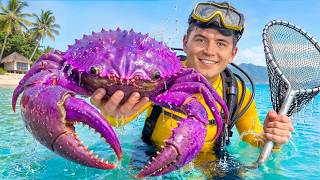
I Ate Rare Food In EVERY Color
 Generate in this style
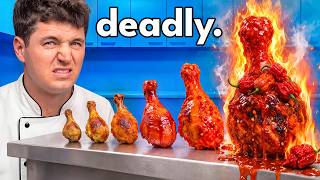
10 Levels Of Spicy Food
 Generate in this style
Can I Turn MrBeast Into A Chef?
 Generate in this style
50 Ways To Use A Watermelon
What works in Food & cooking thumbnails
The strongest cooking thumbnails in our sample turn food into spectacle. The dish is not a side detail: it is scaled up to torso size, glossy and moving, set against a clean saturated background, with a person reacting straight into the lens and almost no overlay text.
| Technique | Why it works in this niche | How to do it |
|---|---|---|
| Giant food as co-star | A lobster bigger than a head or a chocolate castle reads instantly at small sizes and promises something unusual. | Make the dish at least as large as the face and push it toward the lens for forced perspective. |
| Visible escalation | Food videos often climb in price, spice or size; showing the ladder sells the whole video in one glance. | Line up 3–5 versions, with the craziest one biggest and brightest at the end of the row. |
| Glossy motion details | Drips, cheese pulls, molten pours and flames trigger appetite; dry food looks flat. | Add one liquid or motion element per dish: a drip, a splash, steam or fire, kept sharp. |
| Saturated colour blocking | Cobalt-blue walls make red, orange and brown food pop. | Pick a background colour complementary to your hero dish and keep it clean and uniform. |
| In-scene labels instead of captions | Colour cards, flags on toothpicks and props explain the concept without cluttering the image. | Put information on physical labels in the scene; keep overlay text to one word or a price. |
| Uniform plus eye contact | A chef's jacket signals 'cook' anywhere; a direct look with one clear emotion creates connection. | Keep one signature outfit and match a single strong expression to the premise. |
Cooking thumbnail ideas: the main formats
Five compositions cover all 10 analysed thumbnails. Each one visualises the video's structure, so the viewer understands the premise before reading the title.
- Escalating lineup (3 of 10): the person on one side gestures or reacts while a row of items, such as colours, countries or spice levels, recedes or grows across the counter. Used by Nick DiGiovanni.
- Three-panel creation triptych (2 of 10): three equal panels of the same person in the same kitchen, each with a bigger, crazier creation from one ingredient. Used by Nick DiGiovanni for '50 ways' videos.
- Two-panel split comparison (2 of 10): cheap vs expensive or two exotic locations, sometimes with big price labels in the top corners. Used by Nick DiGiovanni.
- Duo / face-off (2 of 10): the person shares the frame with a strong counterpart, a guest or even a lion, with a hero dish between them. Used by Nick DiGiovanni.
- Symmetrical luxury surround (1 of 10): the person centred, framed by dishes held in from the edges, selling abundance. Used by Nick DiGiovanni.
Creators analysed
Nick DiGiovanni
Nick DiGiovanni builds hyper-polished food-spectacle thumbnails: chest-up in a crisp white chef's jacket, wide-eyed surprise or a broad smile, and oversized glistening food held toward the camera. His signature formats are the escalating lineup and the three-panel triptych in a cobalt-blue kitchen. Borrow the scale (food as big as your torso), the clean blue backdrop that makes warm food explode, and the habit of letting props and in-scene labels tell the story instead of headlines.
How to show the dish
In food, the dish is the hook. In the analysed thumbnails it is never small or far away: it is oversized, close to the lens and visibly alive with sauce, fire or steam.
- Scale: make the hero dish as large as the face or the torso; hold it toward the camera for forced perspective.
- Close-up: crop tight so texture, shells and glaze are readable on a phone.
- Motion: add one drip, splash, cheese pull, steam or flame per object.
- Gloss: sharp highlights on sauces and shells signal freshness and taste.
- Colour: warm food (red, orange, brown) against a cool background for maximum contrast.
- Climax: in a lineup, the last item should be the biggest and most extreme, ideally on fire or dripping.
How much text to use
Very little. Text appears on only 2 of the 10 analysed thumbnails. The title carries the hook; the image stays clean.
- Use 0–2 words or a price, never a headline.
- Prices like "$1" and "$100K" work best in a split, one in each top corner.
- Style: heavy white sans-serif with a thick black outline.
- A single lowercase warning word ending with a period, across the top, works for risky concepts.
- Prefer in-scene labels: colour name cards, flags on toothpicks, signs on the counter.
- Keep text in the top corners, away from the face and the hero dish.
Light and colour
The analysed thumbnails are bright, high-key and ultra-saturated, with even, glossy lighting. For general layout and contrast rules, see our YouTube thumbnail design guide.
- Cobalt and sky blue dominate: kitchen cabinets, sky, sea.
- Blue makes red lobster, orange fire, brown chocolate and red watermelon stand out.
- Switch to a themed palette when the concept demands it: rainbow stripes for colours, warm gold satin for luxury, earthy greens for a jungle.
- Light evenly, with sharp highlights on sauces and shells; avoid dim or moody kitchens.
- Keep the background clean and uniform; clutter competes with the food.
How to make a food thumbnail in 4thumb
- Pick a thumbnail format above and press the Generate in this style button.
- Add your photos in the Face block, so the result shows you, not someone else.
- Describe the video: the dish, the escalation (price, spice, size) and the emotion you want.
- Enter 0–2 words or a price in the Thumbnail text field, or leave it empty.
- Generate 2–4 variants and compare them at small size, as they appear in the feed.
Typical mistakes
- Tiny food. The dish is small or far away instead of oversized and pushed toward the lens.
- Headline overload. Long text replaces what the image and props should say; keep it to one word or a price.
- Dull background. Cluttered or dim kitchens instead of a clean saturated colour that contrasts with the food.
- Flat lineup. A row of items with no clear escalation, so the eye has no climax at the end.
- Neutral face. A vague expression or eyes off-camera instead of one clear emotion aimed at the viewer.
- Dry food. Matte dishes without drips, splashes, steam or flames lose appetite appeal.
Questions
How do I make a cooking YouTube thumbnail?
Pick a clear format such as a lineup, a split or a three-panel triptych, make the dish huge and glossy, place it against a clean saturated background, add a direct reaction to camera and keep text to 0–2 words. In 4thumb you choose a style, add your photos, describe the video and generate several variants.
What makes a good food thumbnail?
Oversized food close to the lens, one motion detail like a drip, steam or fire, strong contrast between warm food and a cool background, a single clear emotion, and a composition that shows the video's escalation at a glance.
How much text should a food thumbnail have?
Very little. In the analysed thumbnails only 2 of 10 had any overlay text, and it was one word or a price in heavy white letters with a black outline. In-scene labels like signs and flags do the rest.
Do I need my face on the thumbnail?
All analysed formats feature a person reacting to the food, which adds emotion and scale. If you show yourself, look into the lens with one clear expression. 4thumb uses the photos you add in the Face block.
What size should a cooking thumbnail be?
1280×720 pixels in a 16:9 aspect ratio. 4thumb generates thumbnails in this format, so they are ready to upload.
How much does it cost?
Each generation uses credits. New accounts get free credits to try the tool before buying more.
Creators in this category
All categories- Thumbnails like Nick DiGiovanni
47.7M subscribers
More guides
- Thumbnail ideas
Thumbnail ideas for tutorials, reviews, vlogs, challenges, comparisons, lists, stories and news — what to show, what text to use and what to avoid.
- Thumbnail from a photo
Turn your own photo into a YouTube thumbnail: how identity profiles work, which photos give the best likeness, consent rules and tips for expression and lighting.
- Thumbnail size guide
YouTube thumbnail size and dimensions: 1280×720 px, 16:9 aspect ratio, min 640 px wide, under 2 MB, JPG, PNG or GIF — plus the safe zones phones crop.
- Thumbnail design guide
Design principles for YouTube thumbnails: one focal point, contrast, color, typography, faces, consistency and testing — practical rules you can apply today.
Make your food thumbnail now
Pick a format, add your photo and generate variants that make your dish impossible to scroll past.