Category · Challenges
How to Make a Challenge Thumbnail: 24 Hour, 3AM and Other Challenges
We analysed 20 of the most-viewed thumbnails from 2 top challenge creators, Ryan Trahan and Dima Maslennikov, to see what actually sells a challenge at a glance. Below are the formats, framing, text and color choices they repeat, and how to apply them to your own video.
- 2 creators
- 20 templates
Pick a thumbnail from this niche
Click “Generate in this style” and the thumbnail opens in the generator as a reference. Add your photo and your video idea: 4thumb rebuilds the format — composition, presentation, colors and lighting — not the original’s face or text.
 Generate in this style
I Tried Every Seat on the Most Expensive Airline
 Generate in this style
NIGHT at the DYATLOV PASS! Revealed the MYSTERY? 1 episode of 3
 Generate in this style
I Spent 100 Days in the Metaverse
 Generate in this style
AMONG US в РЕАЛЬНОЙ ЖИЗНИ! Масленников VS ЕГОРИК
 Generate in this style
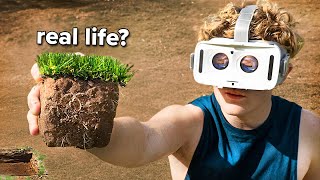
I Spent 100 Days in Realistic Minecraft
 Generate in this style
ТОТ САМЫЙ СТРАШНЫЙ ЛЕС В ЯПОНИИ! ПРОВЕЛ ТАМ НОЧЬ | GhostBuster
What works in challenge thumbnails
A challenge thumbnail has one job: make the rule and the stakes readable in a second. The strongest examples show one clear visual question, such as cheap vs luxury, day 1 vs day 7, or a night alone in a legendary place. They rely on a strong scene and a single prop rather than a headline.
| Technique | Why it works in this niche | How to do it |
|---|---|---|
| Same pose, different world | A split shows the transformation the challenge promises (economy vs first class, day 1 with a coin vs day 7 with cash). | Keep the person at the same scale and eye line in both halves; change only setting, light temperature and the held prop. |
| Prop pushed toward the lens | One object summarises the stakes: a penny, a fan of notes, a grass block, a flashlight. | Place it large in the lower foreground, in the hand nearest the camera, sharply in focus. |
| Calm face, extreme situation | A deadpan or quietly worried look over a luxurious, creepy or surreal scene feels more intriguing than screaming. | Direct gaze, relaxed mouth; let the setting create the tension. |
| Location on one side, person on the other | Night and expedition challenges sell the place itself: the abandoned ship, the morgue, the mountain pass. | Recognizable location on the left 55–60%, tight chest-up portrait on the right third. |
| Crowd hierarchy | Group challenges with guests need one face that wins instantly. | Main person centered and largest, guests symmetric and shrinking toward the edges. |
| One impossible element or fake UI | A single unreal detail or a mock 1-star review card turns the rule into the hook. | Build a believable scene, then add exactly one surprising object or a white review card opposite the face. |
Main challenge thumbnail formats
Across the 20 thumbnails, a handful of layouts repeat. Pick the one that matches your challenge type, or browse more starting points in thumbnail ideas.
- Two-panel split comparison — left/right halves with a thin white divider and bold white labels on top. Used by Ryan Trahan (2 of 10).
- 1-star review card — a tense real location with a white rounded card showing one red star, four grey stars, a date and a short quote. Ryan Trahan (2 of 10).
- VR "real life?" concept — person in a white headset reaching toward the camera with a surreal or real object. Ryan Trahan (2 of 10).
- Immersive scene with one absurd detail — little or no text, one impossible element sells the story. Ryan Trahan (2 of 10).
- Landmark with arrow — huge location, tiny target, red arrow and the word "ME". Ryan Trahan (1 of 10).
- Flashlight expedition poster — person on the right in dark gear with a glowing flashlight, location on the left, grunge title lower left. Dima Maslennikov (3 of 10).
- Costumed squad line-up — main person centered and shouting, guests in colorful costumes on a saturated glow. Dima Maslennikov (3 of 10).
- Sticker heads under game icons — cartoon game characters on top, white-outlined cut-out heads below, no text. Dima Maslennikov (2 of 10).
Challenge creators and what to borrow
Ryan Trahan
Ryan Trahan makes thumbnails that look like polished cinema stills: one person framed chest-up or waist-up, a calm or slightly worried direct gaze, and one key prop held toward the camera. Borrow his discipline: one person, one prop, one visual question, and 1–4 words or none. His splits and review cards are easy templates for budget, travel and rule-based challenges.
Dima Maslennikov
Dima Maslennikov runs two families: dark paranormal night-expedition posters and bright real-life game challenges with guests. Borrow the flashlight as the brightest spot and the location-left, face-right split for night challenges, and the symmetric crowd with a dominant center face plus a game's signature colors for group challenges.
Showing the challenge: 24 hour, 3am and rule-based challenge thumbnails
In this niche the subject is the challenge itself: the rule, the place and the stakes. The person is there to react, but the scene and the prop explain what is happening.
- Time-based challenges (24 hours, 7 days): a split with labels like DAY 1 / DAY 7 and a changing prop shows progress without a sentence.
- Night or 3am challenges: use the flashlight-poster layout — dark, recognizable location, hard beam of light, person large on the right third.
- Rule challenges: make the rule visible, e.g. a mock review card or a held object that states the budget.
- Scale: keep the prop big and in focus in the foreground; for isolation themes, make the target tiny in a huge landscape and point to it with a red arrow.
- Group challenges: scale people by importance so the center face reads first.
- One absurd element maximum: a single impossible detail beats several competing ones.
How much text to use
Very little. Both creators keep text to a few words, and half of Dima Maslennikov's covers have none at all. Text labels or questions the image; it never repeats the title.
- 1–4 words: a question ("real life?") or a label ("Economy" / "First Class", "ME").
- Place it in empty sky, wall or dark space opposite the face, never over it.
- Split thumbnails: bold white uppercase labels with a soft dark shadow on top of each half.
- Night or horror covers: 2–4 distressed white uppercase words on a torn dark plate, lower left, with the place word largest.
- Game challenges: a pixel-game-style title at top center, partly overlapped by heads.
- Plain white lowercase sans-serif on a dark area works for calm, cinematic concepts.
Light and color
Color is chosen by the topic of the challenge, and lighting is always polished and sharp on the face. For general contrast and layout rules, see the YouTube thumbnail design guide.
- Travel and outdoor: bright saturated blue skies, white clothing, vivid green and deep sea blue.
- Luxury or creepy hotels: warm amber, brown and gold interiors.
- Tech and sensory concepts: near-black backgrounds with electric cyan glow.
- Night and horror: desaturated grey, black and cold white with one hot accent (fire orange, blood red or toxic green), plus fog, snow or storm overlays.
- Game and group challenges: full saturation — rainbow costumes against glowing red, electric blue or acid green.
- Use a red accent (arrow, star) to steer the eye; keep skin clean and the background slightly soft.
How to make a challenge thumbnail in 4thumb
- Pick a thumbnail in the style you want on a creator page above and press Generate in this style.
- Add your photos in the Face block (or start from your own shot with thumbnail from photo).
- Describe the video: the challenge, the rule, the location and the key prop.
- Enter 0–2 words in the Thumbnail text field — a label or a short question.
- Generate 2–4 variants and compare them at small size to see which reads fastest.
Common challenge thumbnail mistakes
- Headline walls. Long titles kill the read; keep to 1–4 words or none.
- Overacting everywhere. A calm or quietly worried face often works better than a scream; save the scream for horror or group shouts.
- Mismatched split halves. Different poses or scales in a before/after break the transformation.
- Too many surreal elements. One impossible detail is a hook; three are clutter.
- Generic dark backgrounds. A night challenge without a recognizable location loses its promise.
- Flat crowds and missing references. Equal-sized guests or a game reference without its signature colors and shapes won't read at a glance.
Questions
How do I make a challenge video thumbnail?
Pick one format that fits the challenge (split comparison, flashlight poster, crowd line-up or one absurd scene), show one person with one key prop, add 0 to 4 words opposite the face, and test several variants at small size. In 4thumb you can start from a reference thumbnail and press Generate in this style.
What makes a good challenge thumbnail?
One instantly readable visual question: what is the rule, where is it happening and what is at stake. A clear prop, a strong location and a dominant face matter more than text.
How much text should a challenge thumbnail have?
Very little. The analysed creators use 1 to 4 words, and many thumbnails have no text at all. Use text as a label or a short question, never as the full title.
Do I need my face in the thumbnail?
Usually yes: the main person appears in most of the analysed thumbnails, looking into the camera. But the concept comes first; one analysed thumbnail replaces the person with a red arrow and the word ME pointing at a tiny house.
What should a 24 hour challenge thumbnail look like?
A split with DAY 1 and DAY 7 style labels or a before and after works well for time-based challenges: same pose in both halves, with the setting and prop changing. For night or 3am challenges, a dark location with a flashlight beam reads instantly.
What size is a YouTube thumbnail, and how much does 4thumb cost?
YouTube thumbnails are 1280×720 pixels in 16:9, and 4thumb generates in this format. Each generation uses credits, and new accounts get free credits to try it.
Creators in this category
All categories- Thumbnails like Ryan Trahan
24.1M subscribers
- Thumbnails like Dima Maslennikov
19.9M subscribers
More guides
- Thumbnail ideas
Thumbnail ideas for tutorials, reviews, vlogs, challenges, comparisons, lists, stories and news — what to show, what text to use and what to avoid.
- Thumbnail from a photo
Turn your own photo into a YouTube thumbnail: how identity profiles work, which photos give the best likeness, consent rules and tips for expression and lighting.
- Thumbnail size guide
YouTube thumbnail size and dimensions: 1280×720 px, 16:9 aspect ratio, min 640 px wide, under 2 MB, JPG, PNG or GIF — plus the safe zones phones crop.
- Thumbnail design guide
Design principles for YouTube thumbnails: one focal point, contrast, color, typography, faces, consistency and testing — practical rules you can apply today.
Make your challenge thumbnail
Pick a format from top challenge creators, add your face and generate variants in minutes.