Category · Productivity
Productivity YouTube thumbnails: how to make one
We analyzed the 10 most-viewed thumbnails of 1 top Productivity creator, Ali Abdaal, to see what the format actually looks like. Below you'll find the patterns, formats, text and color rules, plus a step-by-step way to build a thumbnail in that style with your own face and topic.
- 1 creator
- 10 templates
Pick a thumbnail from this niche
Click “Generate in this style” and the thumbnail opens in the generator as a reference. Add your photo and your video idea: 4thumb rebuilds the format — composition, presentation, colors and lighting — not the original’s face or text.
 Generate in this style
9 Passive Income Ideas - How I Make $27k per Week
 Generate in this style
How to Invest for Beginners
 Generate in this style
Why You're Always Tired - 7 Myths Ruining Your Sleep
 Generate in this style
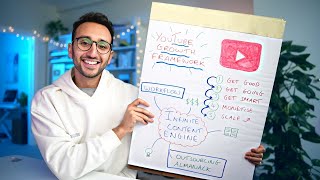
If I Started a YouTube Channel in 2026, I'd Do This
 Generate in this style
How I Type REALLY Fast (156 Words per Minute)
 Generate in this style
How I ranked 1st at Cambridge University - The Essay Memorisation Framework
What works in Productivity thumbnails
Productivity thumbnails sell calm competence: a friendly person in a cozy, cinematic workspace plus one clear visual idea. In the analyzed set, the image carries the promise, and text is either absent or reduced to one number or two words.
| Technique | Why it works in this niche | How to do it |
|---|---|---|
| Cozy cinematic set | A tidy home office with plants, bookshelves and fairy lights makes the advice feel like a life the viewer wants. | Shoot at a desk with portrait mode or a fast lens, a plant and warm lamp behind you, a blue/teal accent light on the opposite side. |
| Icon halo for list videos | Each tip becomes a visible item, so a list video looks full of value at a glance. | One simple flat icon per tip on white rounded tiles, arranged in two arcs left and right of your head, never over the face. |
| One hero object | A single prop (keyboard, notebook, clock) turns an abstract method into something concrete. | Hold the prop close to the lens at a slight diagonal so it is large and sharp. |
| Visible proof | Dense notes, charts or a filled-in framework board signal real effort and evidence behind the advice. | Show a real artifact of your work with enough detail to look authentic; it doesn't need to be readable. |
| Split transformation | A tired half versus a fresh half shows the result of the habit instantly. | Shoot two versions with identical framing, grade one cold and tired, one warm and fresh, join them at the nose with a thin white line. |
| Number as the promise | A concrete figure like $27,000 or $0 → $1M makes the outcome tangible. | One large, specific number in heavy white sans-serif with a soft shadow; add a bright green arrow for a from-to journey. |
Main formats for productivity, study and self-improvement thumbnails
Five formats cover the analyzed thumbnails. All of them put a smiling person at a desk in the center of the story; what changes is the single visual idea around them. For more starting points, see thumbnail ideas.
- Hero object hold-up (3 of 10) — the person presents one meaningful object toward the camera as proof or a teaser of the method. Used by Ali Abdaal.
- Icon halo (2 of 10) — the person centered, surrounded by white tiles or circles with colorful flat icons, one per tip. Used by Ali Abdaal.
- Before/after split face (2 of 10) — the face split vertically into a bad and a good half, optionally labeled BEFORE/AFTER. Used by Ali Abdaal.
- Script title over footage (2 of 10) — an older style: b-roll or talking head with a large white handwritten-script title and a small white box label. Used by Ali Abdaal.
- Money jump (1 of 10) — two big white dollar amounts on either side of the person, linked by a bright green arrow arching over the head. Used by Ali Abdaal.
Creators to learn from
Ali Abdaal
Ali Abdaal builds clean, premium-lifestyle thumbnails in a cozy home office: framed waist-up at a desk, smiling warmly at the camera, often in glasses and a plain solid-color top. His signature is pairing that calm presence with exactly one idea — an icon halo, a hero object, a split face or a money jump. Borrow the blue/warm cinematic lighting, the open gestures (palms-up shrug, holding an object forward) and the discipline of using one number or two words at most.
How to show the subject: you, your desk and one object
In this niche the subject is the person and their result. The viewer should read trust from the face and the method from one object or graphic.
- Framing: waist-up or chest-up at a desk, centered or slightly off-center; an extreme close-up only when the face itself is the topic.
- Expression: a genuine smile, often with teeth, looking straight at the camera. Strong contrast only appears in split shots (tired vs happy).
- Hero object: one prop that symbolizes the result, held close and angled so it is big at thumbnail size.
- Proof artifacts: real handwritten notes, a chart or a hand-drawn framework board add credibility.
- Wardrobe: plain solid colors such as cream, grey, burgundy or teal, so clothing doesn't compete with icons or arrows.
- Background: plants, bookshelves, posters and fairy lights, softly blurred.
How much text and where
Half of the analyzed thumbnails have no text at all. When text appears, it is one or two elements and never repeats the full video title. Keep it legible at the standard thumbnail size.
- 0–2 words or one number: a dollar amount, or BEFORE/AFTER.
- Style: heavy white sans-serif with a soft drop shadow.
- Placement: a number at the bottom, two amounts flanking the head, or labels on each side of a split.
- Accent: BEFORE in yellow and AFTER in white is the one color variation used.
- Never over the face: text and icons sit around the person, not on them.
- Older alternative: a large white handwritten-script title plus a small white rectangular label with dark uppercase text.
Light and color
The look is soft and cinematic: natural, slightly desaturated grading with crisp detail on the face. For general layout and contrast rules, see our YouTube thumbnail design guide.
- Two-tone light: cool blue/teal ambient light on one side, warm orange lamp glow on the other.
- Shallow depth of field: a blurred background with soft bokeh from fairy lights.
- Face clarity: keep the face the sharpest, best-lit area of the frame.
- Accents from graphics: colorful flat icons, a bright green arrow or a yellow label provide the pops of color.
- Split grading: in before/after shots, one half cold and dull, the other warm and fresh.
How to make a Productivity thumbnail in 4thumb
- Pick a thumbnail you like above or on the Ali Abdaal page and press Generate in this style.
- Add your photos in the Face block — a few clear shots of your face work best.
- Describe the video: the topic, the result you promise and the object or icons you want shown.
- Enter 0–2 words in the Thumbnail text field, such as a number or BEFORE/AFTER, or leave it empty.
- Generate 2–4 variants and compare them at small size to pick the one that reads fastest.
Common mistakes
- Shock face. An open-mouth, shocked expression breaks the style; this niche relies on a calm, confident smile that signals trust.
- Long titles. Cluttering the frame with the full title instead of one big number or two words.
- Messy icons. Placing icons over the face or mixing icon styles instead of one consistent flat set on white shapes.
- Flat lighting. An evenly lit room without depth of field loses the cozy blue/warm mood.
- Tiny prop. Holding the hero object too small or too far away, so it doesn't read at thumbnail size.
- Mismatched split. Before/after halves that differ in framing instead of only in color grade and expression.
Questions
How do I make a Productivity YouTube thumbnail?
Shoot or generate yourself at a tidy desk, framed waist-up and smiling at the camera, with soft blue and warm light. Add one visual idea, such as a hero object, an icon halo, a before/after split or a money figure, and keep text to one number or two words. In 4thumb, pick a reference, add your face photos, describe the video and generate several variants.
What makes a good study or self-improvement thumbnail?
A trustworthy, calm face, a cozy cinematic workspace and one clear promise. Proof elements like real notes or a framework board help, and the result should be readable at small size without relying on text.
How much text should a Productivity thumbnail have?
Very little. Half of the analyzed thumbnails have none. When used, it is one or two words or a single number in bold white sans-serif with a soft shadow, placed so it never covers the face.
Do I need my face on the thumbnail?
In the analyzed thumbnails a person appears in every format, and the warm, confident expression is a big part of the appeal. A face-free version is possible, but you would lose the trust signal this niche relies on.
What size should a Productivity thumbnail be?
1280×720 pixels in a 16:9 aspect ratio. 4thumb generates thumbnails in this format.
How much does it cost to make a thumbnail in 4thumb?
Each generation uses credits. New accounts get free credits to try it out.
Creators in this category
All categories- Thumbnails like Ali Abdaal
6.7M subscribers
More guides
- Thumbnail ideas
Thumbnail ideas for tutorials, reviews, vlogs, challenges, comparisons, lists, stories and news — what to show, what text to use and what to avoid.
- Thumbnail from a photo
Turn your own photo into a YouTube thumbnail: how identity profiles work, which photos give the best likeness, consent rules and tips for expression and lighting.
- Thumbnail size guide
YouTube thumbnail size and dimensions: 1280×720 px, 16:9 aspect ratio, min 640 px wide, under 2 MB, JPG, PNG or GIF — plus the safe zones phones crop.
- Thumbnail design guide
Design principles for YouTube thumbnails: one focal point, contrast, color, typography, faces, consistency and testing — practical rules you can apply today.
Make your Productivity thumbnail
Pick a format, add your face and get several variants to compare in minutes.