Category · Science
Science YouTube Thumbnails: How to Make One
We analysed 10 of the most-viewed thumbnails from 1 top Science creator, Kurzgesagt, to see what makes a science thumbnail readable at a glance. Below are the formats, colours and text rules that repeat, plus a step-by-step way to build your own in 4thumb.
- 1 creator
- 10 templates
Pick a thumbnail from this niche
Click “Generate in this style” and the thumbnail opens in the generator as a reference. Add your photo and your video idea: 4thumb rebuilds the format — composition, presentation, colors and lighting — not the original’s face or text.
 Generate in this style
The Coronavirus Explained & What You Should Do
 Generate in this style
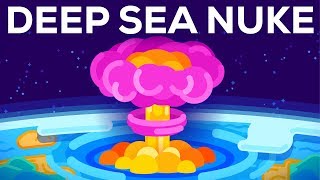
What If You Detonated a Nuclear Bomb In The Marianas Trench? (Science not Fantasy)
 Generate in this style
The Largest Star in the Universe – Size Comparison
 Generate in this style
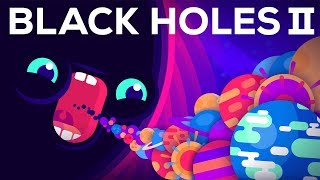
Why Black Holes Could Delete The Universe – The Information Paradox
 Generate in this style
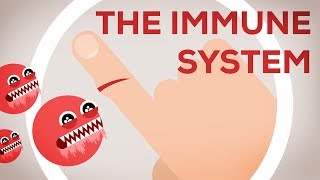
The Immune System Explained I – Bacteria Infection
 Generate in this style
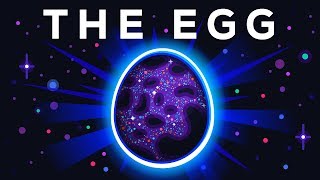
The Egg - A Short Story
What works in Science thumbnails
The analysed thumbnails are flat vector illustrations with no live presenter: one glowing subject on a dark cosmic or microscopic background under a huge white headline of 1–3 words. Science topics are often abstract or invisible, so the thumbnail turns them into a single clear shape, a character, or a scale comparison.
| Technique | Why it works in this niche | How to do it |
|---|---|---|
| Edge-to-edge headline | The topic noun reads instantly, even at phone size, and frames the video as a clear subject | Pick 1–3 words, set them in white heavy geometric caps and scale until they touch both side margins at the top |
| Glow against darkness | Space and micro-worlds feel vast and mysterious; neon on navy pops in a feed | Use a near-black blue or purple background and give the central object a bright halo, rim light and rays |
| Eyes on abstract things | Viruses, germs or black holes become emotional and threatening or funny | Add oversized round eyes with white highlights and a teeth-baring or gaping mouth |
| Tiny dot vs giant | Scale is a core science hook; a comparison shows it without words | Crop a giant curved object across the top half, leave dark space below, add a white arrow and label to a tiny dot |
| Curved horizon stage | A planet curve gives dramatic events (explosions, creatures) a sense of planetary stakes | Place a curved horizon in the lower third and centre the event on it |
| Confetti particles | Adds depth and a cosmic feel without competing with the subject | Sprinkle small pink, teal and blue dots and four-point sparkles in the background |
Main formats of a science thumbnail
Three formats cover all 10 analysed thumbnails. Choose the one that matches the question your video answers: what is it, who is the villain, or how big is it.
- Hero object under headline (4 of 10, used by Kurzgesagt): a single glowing object or creature — an egg, an explosion, a bacteriophage — centred on a dark starry background, often on a curved planet horizon, with the topic in white caps across the top.
- Cartoon character with big eyes (4 of 10, used by Kurzgesagt): viruses, germs, aliens or a black hole personified with huge round eyes and mouths, menacing or comically shocked.
- Size comparison with arrow (2 of 10, used by Kurzgesagt): a gigantic curved surface fills the top half; below, a white arrow points to a tiny dot labelled with a familiar object.
Science YouTubers whose thumbnails we analysed
Kurzgesagt
Kurzgesagt builds every thumbnail as a pure flat vector scene: rounded geometric shapes, soft gradients, no outlines, and one dominant subject glowing against navy, indigo or near-black. Borrow the one-subject rule, the full-width white caps headline and the habit of giving abstract things huge cartoon eyes. For scale topics, borrow the giant-surface-plus-tiny-dot layout with a thick white arrow. Sequels simply add a Roman numeral to the headline.
How to show the science subject
In Science the subject is the concept itself — a planet, a microbe, an explosion, a black hole. It has to be one readable shape, large and centred, rendered as a simple illustration rather than a photo or 3D render.
- One dominant subject, centred under the headline; avoid several equal-weight objects.
- Personify the invisible: viruses, germs and aliens get oversized eyes and open mouths — wide-eyed alarm, jagged-tooth grins or comic gulping.
- Show scale with a comparison: crop the giant object so it overflows the top half and point to a tiny dot labelled with something familiar.
- Give events a stage: put explosions or creatures on a curved horizon in the lower third.
- Flat, rounded geometry with soft gradients and rim highlights; no outlines.
- If you appear, be drawn as a flat-shaded cartoon with big round, staring eyes, never photoreal.
Text on an educational thumbnail: how much and where
Text is minimal and always the topic noun or a short what-if phrase, never a sentence. It sits across the full top edge and lets the image do the rest.
- 1–3 words, all caps, bold white geometric sans-serif.
- Spans the full width of the top edge, edge to edge.
- No stroke, shadow box or colour highlights on the letters.
- Size comparisons add a second, smaller white label beside a thick white arrow at the bottom.
- Sequels add a Roman numeral rather than a longer title.
- The one exception in the set uses red caps on a light background — treat it as a rare contrast move, not the default.
Light and colour
Colour does most of the work: a dark background makes saturated neon subjects glow. Each thumbnail is dominated by one temperature with a contrasting accent. For general layout and contrast rules, see our YouTube thumbnail design guide.
- Backgrounds: deep navy, indigo, plum or near-black, sometimes graded to magenta or maroon.
- Subjects: hot pink, orange, yellow, cyan, teal, mint green in flat shapes with soft gradients.
- Glow: strong outer glow and rim highlights on the subject; small glowing dots and stars around it.
- Match temperature to topic: warm subjects like fire and stars on dark red; cool subjects like black holes and oceans on blue-violet.
- Avoid bright or white backgrounds — they kill the neon contrast.
How to make a Science thumbnail in 4thumb
- Pick a thumbnail you like on a creator page such as Kurzgesagt and press Generate in this style.
- Add your photos in the Face block if you want to appear — in this style you will be rendered as a flat cartoon figure.
- Describe the video: the topic, the single subject to show and the mood (awe, alarm, curiosity).
- Enter 0–2 words in the Thumbnail text field — ideally the topic noun.
- Generate 2–4 variants and compare them at small size, the way they appear in the feed.
Common mistakes in Science thumbnails
- Photos instead of illustration. Photos or 3D renders break the clean flat-vector look that makes abstract topics readable.
- A sentence as the title. A long headline shrinks the type; keep 1–3 topic words in white caps across the top.
- Too many objects. Several equal-weight objects hide the point; one dominant glowing subject wins.
- Reaction-style decoration. Outlines, drop shadows, yellow text and red arrows clash with the educational look.
- Light backgrounds. Bright or white backgrounds remove the glow contrast that makes neon subjects pop.
- Small, realistic eyes. Characters lose their emotional read; make the eyes huge and round.
Questions
How do I make a Science YouTube thumbnail?
Pick one subject, draw it as a flat glowing illustration on a dark navy or black background, and put 1–3 topic words in white caps across the top. In 4thumb you can choose a reference thumbnail, describe your video and generate several variants in that format.
What makes a good educational YouTube thumbnail?
One clear subject, strong contrast between a dark background and saturated colours, minimal text, and a hook such as a personified character or a scale comparison that makes an abstract topic feel concrete.
How much text should a science thumbnail have?
Usually 1–3 words: the topic noun or a short what-if phrase. Size comparisons can add a second small label next to an arrow.
Do I need my face on a Science thumbnail?
No. The analysed thumbnails have no live presenter; emotion comes from cartoon characters with big eyes. If you want to appear, you can be drawn as a flat cartoon figure in the same style.
What size should a YouTube thumbnail be?
1280×720 pixels, 16:9. 4thumb generates thumbnails in this format. More details are in our YouTube thumbnail size guide.
How much does it cost to make a thumbnail in 4thumb?
Each generation uses credits. New accounts get free credits to try it out.
Creators in this category
All categories- Thumbnails like Kurzgesagt
25.7M subscribers
More guides
- Thumbnail ideas
Thumbnail ideas for tutorials, reviews, vlogs, challenges, comparisons, lists, stories and news — what to show, what text to use and what to avoid.
- Thumbnail from a photo
Turn your own photo into a YouTube thumbnail: how identity profiles work, which photos give the best likeness, consent rules and tips for expression and lighting.
- Thumbnail size guide
YouTube thumbnail size and dimensions: 1280×720 px, 16:9 aspect ratio, min 640 px wide, under 2 MB, JPG, PNG or GIF — plus the safe zones phones crop.
- Thumbnail design guide
Design principles for YouTube thumbnails: one focal point, contrast, color, typography, faces, consistency and testing — practical rules you can apply today.
Make your Science thumbnail
Pick a format that works in Science and generate variants for your video in minutes.