Category · Entertainment
How to Make an Entertainment Thumbnail
We analysed 32 of the most-viewed thumbnails from 3 top Entertainment creators: MrBeast, Nick DiGiovanni and Dhar Mann. Below are the formats, faces, text rules and colors they repeat, and how to apply them to your own video.
- 7 creators
- 72 templates
Pick a thumbnail from this niche
Click “Generate in this style” and the thumbnail opens in the generator as a reference. Add your photo and your video idea: 4thumb rebuilds the format — composition, presentation, colors and lighting — not the original’s face or text.
 Generate in this style
50 Ways To Use Chocolate

 Generate in this style
I Tried Every Seat on the Most Expensive Airline
 Generate in this style
NIGHT at the DYATLOV PASS! Revealed the MYSTERY? 1 episode of 3
 Generate in this style
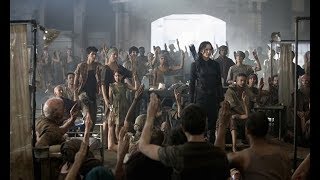
I Was In Hunger Games And Ruined A Scene
What works in Entertainment thumbnails
Entertainment thumbnails sell a situation, not a topic. The analysed creators show one person with one huge emotion next to one obvious stake: a price gap, a giant object, a visible escalation or a story conflict. Everything else is stripped away so the idea reads at phone size.
| Technique | Why it works in this niche | How to do it |
|---|---|---|
| One exaggerated emotion | The viewer decides in a split second whether the video is fun, tense or sad; a single readable face answers that. | Chest-up or tighter, face sharp and well lit. Huge smile for wins, gritted teeth or exhaustion for challenges, tears or shock for drama. |
| Stakes that read without the title | Challenge and spectacle videos live on contrast and scale. | Show cheap vs expensive side by side, giant crowds, money or luxury objects. One situation per thumbnail. |
| Oversized hero object | A big object next to a face creates instant spectacle. | Make the key object at least as large as the face and push it toward the lens for forced perspective. |
| Visible escalation | Ladder videos (levels, prices, sizes) need the progression to be seen. | Line up 3–5 versions growing left to right, with the craziest one biggest and brightest at the end. |
| In-scene labels instead of captions | Clean images stay readable; the title carries the hook. | Use signs, flags or props inside the scene; keep overlay text to a price, a day counter or one word. |
| Fixed, recognizable layout | Viewers spot your video in the feed before reading anything. | Lock one composition, as Dhar Mann does with text left and face right, and only swap face, emotion, set and words. |
Main formats, from story drama to the 24 hour challenge thumbnail
Most top Entertainment thumbnails fall into a handful of repeatable layouts. Pick the one that matches your video's premise, then browse more thumbnail ideas if you need variations.
- Single dramatic close-up — one person, one emotion, no split. Used by MrBeast and, with a headline box, by Dhar Mann.
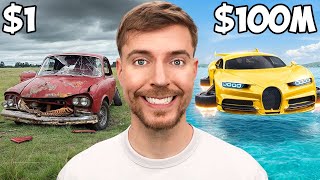
- Cheap vs expensive split — two halves with price labels like "$1" and "$1M" in the top corners. Used by MrBeast and Nick DiGiovanni.
- Survival / challenge close-up — exhausted, soaking wet or worn-out person in the scene of the challenge, sometimes with a "DAY 6" counter. Used by MrBeast; the natural fit for a 24-hour or multi-day challenge.
- Escalating lineup — the person on one side gestures along a row of items that grow in intensity. Used by Nick DiGiovanni (3 of his 10 analysed thumbnails).
- Three-panel triptych — the same person three times with bigger creations each panel. Used by Nick DiGiovanni for "50 ways" style videos.
- Duo / confrontation — the main person faces a guest, an animal or an aggressor at the frame edge. Used by Nick DiGiovanni and Dhar Mann.
- Hidden-face mystery prop — the face is covered by an odd object, which becomes the hook. Used by Dhar Mann.
Creator styles worth studying
MrBeast
MrBeast uses bright, high-key, very clean images: the person chest-up looking into the lens with an instantly readable emotion, plus one situation with enormous stakes — cheap vs expensive halves, crowds, money, luxury. Borrow the discipline: sunny or studio light, clean backgrounds, and at most one or two short labels such as a price or a day counter.
Nick DiGiovanni
Nick DiGiovanni turns food into spectacle: a signature white chef's jacket, food scaled to torso size, glossy drips and flames, cobalt-blue backgrounds. Text appears on only 2 of his 10 analysed thumbnails. Borrow the oversized hero object, the escalating lineup and the idea of one signature outfit that tells viewers who you are.
Dhar Mann
Dhar Mann runs one fixed template: an actor's tight close-up on the right with one maximal emotion, a softly blurred real set, and a black box on the left with a three-line premise, one line in sky blue. Borrow it for scripted or story content: write the conflict as a full sentence and color only the word that carries the twist.
How to show the main subject: the person and the stakes
In Entertainment the subject is a person reacting to a situation. The face sets the mood; the object, setting or opponent proves the stakes. Both must be readable at a glance. If you shoot yourself, a clean photo is enough to start — see thumbnail from photo.
- Framing: chest-up for MrBeast and Nick DiGiovanni style; tight head-and-shoulders filling about 40–50% of the frame for story drama.
- Eyes: straight into the lens for challenges and spectacle; slightly off-camera toward an unseen opponent for scripted scenes.
- Hands: active — holding the object toward the viewer, presenting with an open palm, or sweeping toward a lineup.
- Scale: the key object at least face-sized, pushed toward the camera.
- Condition shows the challenge: wet hair, torn clothes or an exhausted pose tell a survival story without words.
- Motion details: a drip, splash, steam or fire on the hero object adds energy.
How much text and where
There are two valid approaches in this niche. Spectacle and challenge thumbnails use almost no text. Story thumbnails use a full premise sentence in a fixed box. Do not mix them.
- Spectacle / challenge: none, or one or two short labels — "$1", "$1M", "DAY 6" — in bold white sans-serif with a thick black outline, in the top corners.
- One-word warning: a single lowercase word ending with a period across the top, as Nick DiGiovanni occasionally does.
- Story / drama: a solid black box on the left, three lines of heavy condensed uppercase, two white and one sky blue for the twist.
- Rewrite, do not repeat: the thumbnail line should add an angle the title does not already state.
- No decoration: no arrows, emojis or circles in any of these styles.
Light and color
All three creators use bright, even light and clean saturation. Dark, muddy scenes are absent from the analysed spectacle thumbnails. For general layout and contrast rules, see our YouTube thumbnail design guide.
- Daylight or bright studio light with crisp detail; blue skies, turquoise water, gold, red and yellow accents for big-stakes videos.
- Complementary background: cobalt or sky blue makes red, orange and brown objects pop; gold satin for luxury, earthy greens for outdoor themes.
- Glossy highlights on liquids, shells and sauces for food or object spectacle.
- Soft TV-drama light with natural skin tones and a softly blurred set for scripted stories.
- One saturated wardrobe color (red, teal, yellow) separates the person from the background.
- Brand constants: if you use a text box, keep it to black, white and one accent color.
How to make it in 4thumb
- Pick a creator page above that matches your format and press Generate in this style on the thumbnail you like.
- Add your photos in the Face block so the main person is you.
- Describe the video: the challenge or premise, the stakes, the emotion and any key object or setting.
- Enter 0–2 words in the Thumbnail text field — a price, a day counter or one word — or leave it empty.
- Generate 2–4 variants and compare them at small size, as they will appear in the feed.
Common mistakes in Entertainment thumbnails
- Neutral face. A vague or mixed expression kills the format; pick one emotion and exaggerate it.
- Small stakes. The key object or contrast is tiny or far away instead of oversized and pushed toward the lens.
- Too many words. Long headlines on spectacle thumbnails; keep it to a price or a counter, and leave full sentences to the boxed story format.
- Busy, dim background. Cluttered or dark sets compete with the face; use a clean saturated color or a softly blurred set.
- Lineup without a climax. Items in a row that do not escalate leave the eye with nothing to land on.
- Text on the raw photo. For story headlines, skipping the solid box hurts readability and recognition.
Questions
How do I make an entertainment thumbnail?
Choose one format that matches your premise (close-up, cheap vs expensive split, lineup or story box), show one person with one strong emotion, make the stakes visible and big, use bright clean light and keep text to a price, counter or short premise. In 4thumb, pick a reference, add your photo, describe the video and generate several variants.
What makes a good challenge or prank thumbnail?
A situation that reads without the title: a clear reaction face looking at the viewer, an obvious stake or contrast, a clean background and almost no text. For multi-day challenges, a short day counter in a top corner shows progress.
How much text should an entertainment thumbnail have?
For spectacle and challenge videos, none or one or two short labels such as a price or day number in the top corners. For scripted story videos, a three-line premise in a solid box works, with only one line in an accent color.
Do I need my face on the thumbnail?
All three analysed creators build thumbnails around a person with a strong emotion, so a face is strongly recommended. It does not have to be the host: Dhar Mann uses actors. A face hidden by a mystery prop is a rare but working exception.
What size should an entertainment thumbnail be?
1280×720 pixels in a 16:9 ratio. 4thumb generates thumbnails in this format, so you can upload them directly.
How much does it cost?
Each generation uses credits. New accounts get free credits to try the generator before buying more.
Creators in this category
All categories- Thumbnails like MrBeast
521M subscribers
- Thumbnails like Nick DiGiovanni
47.7M subscribers
- Thumbnails like Dhar Mann
27.7M subscribers
- Thumbnails like Ryan Trahan
24.1M subscribers
- Thumbnails like Dima Maslennikov
19.9M subscribers
- Thumbnails like Moist Critikal
18.3M subscribers
![MrLololoshka — 😨 Minecraft SPEEDRUNNER vs 3 HUNTERS • [+ FLIGHT]](https://i.ytimg.com/vi/TtdlfECyj-Q/mqdefault.jpg) Thumbnails like MrLololoshka
Thumbnails like MrLololoshka11.4M subscribers
More guides
- Thumbnail ideas
Thumbnail ideas for tutorials, reviews, vlogs, challenges, comparisons, lists, stories and news — what to show, what text to use and what to avoid.
- Thumbnail from a photo
Turn your own photo into a YouTube thumbnail: how identity profiles work, which photos give the best likeness, consent rules and tips for expression and lighting.
- Thumbnail size guide
YouTube thumbnail size and dimensions: 1280×720 px, 16:9 aspect ratio, min 640 px wide, under 2 MB, JPG, PNG or GIF — plus the safe zones phones crop.
- Thumbnail design guide
Design principles for YouTube thumbnails: one focal point, contrast, color, typography, faces, consistency and testing — practical rules you can apply today.
Make your Entertainment thumbnail
Pick a format from top creators, add your photo and get several variants in minutes.